Cannot select PAY USING BALANCE due to banner over the top Telling me to pay with my eBay balance 😮
Summary: skp-mpcr is experiencing an issue on eBay where a banner obstructs the option to select 'Pay Using Balance' when making an offer on a product. Despite attempts to change the payment method via various browsers and devices, the problem persists. *vyolla* suggests trying the 'change' link without success, and acknowledges encountering other glitches on the site. ile136yz recommends adjusting the page zoom to move the banner, while john1297576 queries the timing of the offer acceptance, which skp-mpcr clarifies is unrelated, as payment preference needs setting before the seller's acceptance.
Hi guys,
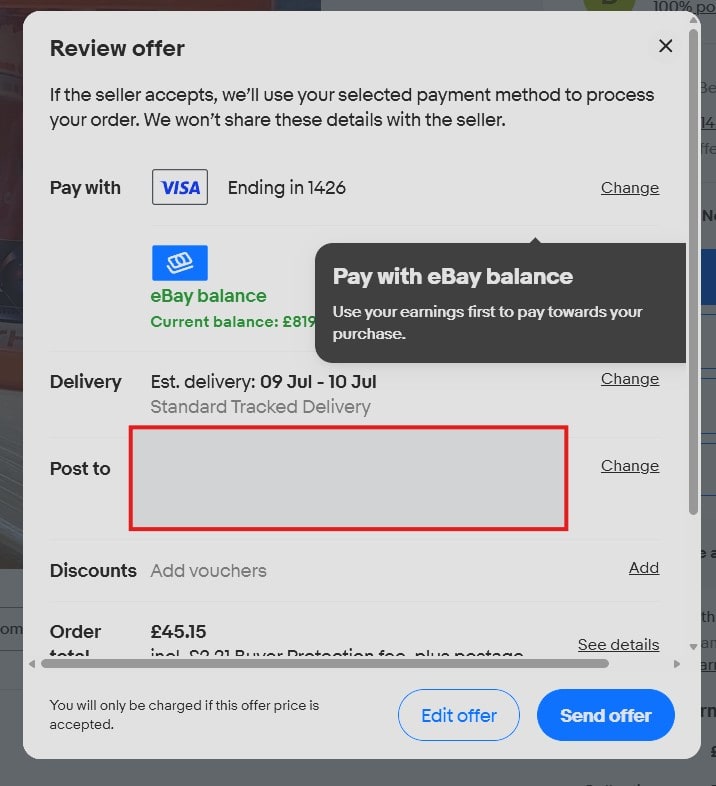
when I try to make an offer on a product, it is impossible to select USE eBay BALANCE because there is a very annoying box right over the button telling me to click PAY WITH BALANCE. This has been happening for 2 weeks.
Is anyone else having this issue?
I hope someone from eBay tech sees this and gets it sorted ASAP.

john1297576
MentorHas seller accepted your offer? Payment can only be made after acceptance, it does say AFTER acceptance, nothing will happen until then.
skp-mpcr
OPIt's irrelevant as this needs changing when you make the offer, NOT AFTER!
The payment can be changed BEFORE seller accepts. If I don't select balance it used the card that is preset to be used!
ile136yz
MentorHi,
Is the photo shot from your phone?
If you can view the page on a laptop or PC you could decrease the size of the page to for example 75% the black box covering the pay by balance will move on the page.
skp-mpcr
OPHi, thanks for this but it's on a PC (and several others), scaling the DPI or changing the desktop resolution does not make it go away. It does move around and maybe after changing it multiple times and messing about with resolution and DPI it might be out of the way enough to click, but that's not really the point. The site is broken and needs fixing.
*vyolla*
MentorThat box just features an explanatory notice, that you can use your eBay balance to pay for the item.
What happens if you click on the 'change' text link next to your primary payment method, Visa? Can you change it to your eBay balance?
skp-mpcr
OPSadly not, of course I tried that, but it only offers card payments.
The button I need is right under the banner, but the banner will not go away.
I used to click the banner, and it would select the balance payment, but the banner no longer disappears.
I own a computer company, and we have tried on several PC's, and Edge, FF and Chrome, the issue is on all of them so it must be an issue on the site, but I have no way to report it to them directly. I could call my concierge, but I'll see what happens here first ;)
*vyolla*
MentorThere appear to be a few weird glitches on the site at the moment. I'm finding that some buttons are there but unresponsive (including the Withdraw button when you go to transfer out an eBay balance), and some screens feature just outlines of fields when you load them and you have to reload. All odd stuff!
skp-mpcr
OPYeah, same here, I just had one where the collection button would not work :/